Feature Updates - February 2026
February brings a whole host of improvements for Memberspot—from new AI features and better email transparency to more personalization in the community.
Here is an overview of the most important updates of the month.
Sentiment Survey now controllable with attribute groups
The sentiment survey can now be activated specifically for certain member groups.
Previously, the survey was either active for all members or completely disabled. Now, administrators can restrict it to specific attribute groups.
New settings:
- "Active only for selected members" in the survey setup
- "Sentiment barometer for this group active" in the detailed view of an attribute group
This allows sentiment surveys to be used in a targeted manner, for example for:
- a new onboarding cohort
- a specific team
- a defined community group
The survey itself continues to function as usual—as a modal with smiley ratings and optional follow-up questions.
Email bounce information directly in the admin area
Admins can now view the delivery status of every email sent directly in the member profile. A color-coded status overview is displayed in the "Notifications" tab. The data is loaded live from the email provider and also includes open and bounce tracking. This allows delivery problems to be identified immediately—without having to contact support.
The history is stored for 30 days and can be updated at any time.
Google login for members
Members can now log in directly with their Google account.
When enabled, the button appears on the login page:
"Sign in with Google"
Important: Google Login is not SSO.
It does not create new accounts or synchronize user data.
Members must already have an account on the Memberspot platform.
You can find more information about logging in via Google here: Help article
New AI Agent History
Admins now have complete transparency over all conversations held by their AI agents.
The new History tab within AI Agents contains:
- all school conversations
- the name of the member
- the agent used
- Time of the conversation
- existing feedback (reviews or likes)
One click opens the complete chat history, including:
- AI model used
- Timestamp of all messages
Filter options:
- by member
- by agent
- only conversations with feedback
- Sort by date
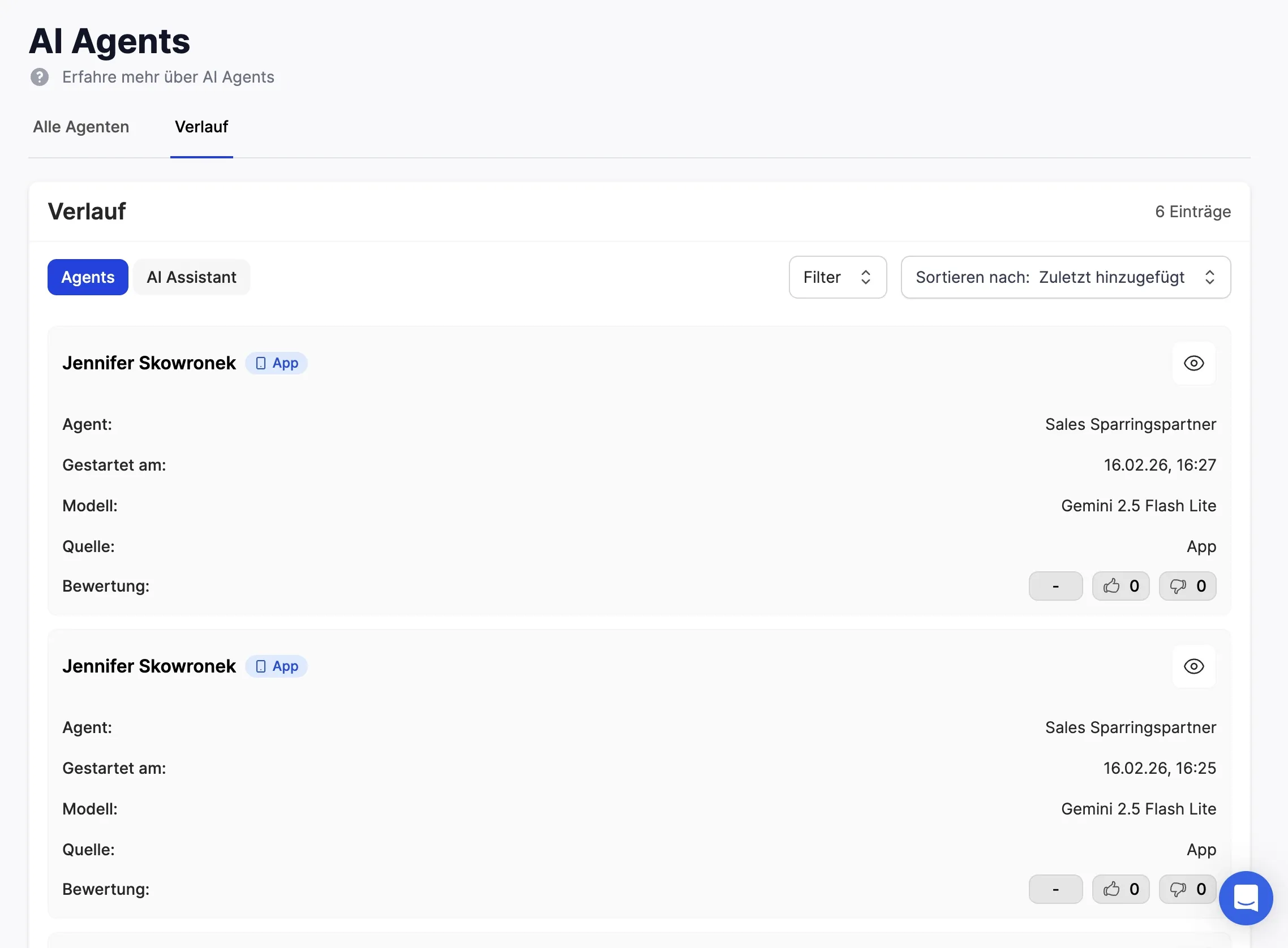
This makes it easier to analyze AI responses and identify typical questions from members more quickly.
Expanded selection of AI models
The model selection for AI agents has been significantly expanded.
Admins can now choose between different Google Gemini and OpenAI GPT models.
Examples:
Google Gemini
- Gemini 2.5 Flash Lite
- Gemini 2.5 Flash
- Gemini 3 Flash (Preview)
- Gemini 2.5 Pro (Beta)
OpenAI
- GPT-5 nano
- GPT-5 mini
- GPT-4.1 Mini
- GPT-4.1
- o4-mini
- o4-mini-high
When a model is discontinued, the system automatically migrates to its successor.
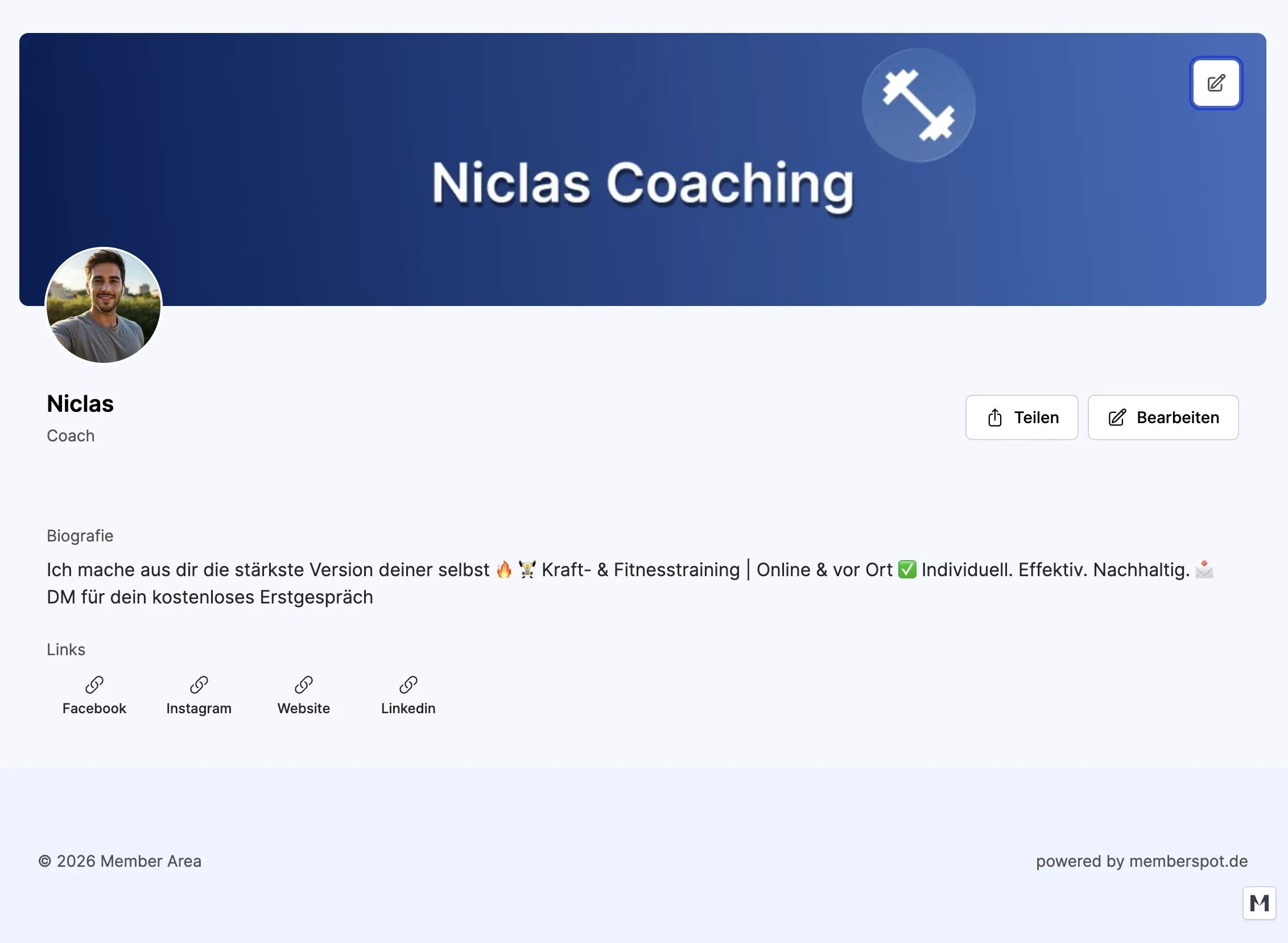
Cover images for community profiles
Community profiles can now be personalized with a cover image.
Members can change their cover photo in the profile settings:
- upload
- tailor
- remove
The image is automatically adjusted and optimized to a format of 1180 × 240 pixels (5:1).
In the profile, the cover is displayed as a wide banner and adds another level of personalization to the avatar.
The result: more vibrant profiles and a stronger community identity.
New Zapier & Make endpoints for member attributes
The Memberspot API now supports setting custom member attributes via Zapier and Make.
Enable new endpoints:
- Setting a single attribute
- Setting multiple attributes simultaneously
This allows automations such as the following to be implemented:
- automatic segmentation based on purchasing behavior
- Synchronization of CRM data
- Updating member metadata from external systems
The required property IDs can be retrieved via a dedicated API endpoint.
Together with existing functions such as granting access, changing offer status, or creating login tokens, this significantly expands the automation options.
New email digests
Memberspot now sends intelligent email digests summarizing activities that members may have missed.
.webp)
There are two variants:
Notification Digest
- Community contributions
- Comments
- mentions
- assessed levies
Chat Digest
- new chat messages
- Preview of the last message
- Number of unread messages
The shipping logic uses an intelligent backoff system:
- First email after 3 hours (chat: 5 minutes)
- After that, the intervals will be extended automatically.
- maximum 14 days for notifications
- maximum 24 hours for chats
Admins can enable or disable digests in the email templates. Members can also unsubscribe from them in their notification settings.
In short
The February updates bring improvements in many areas:
- More control over surveys and member segments
- greater transparency in email delivery
- Convenient login for members
- More analysis tools for AI agents
- Wider selection of AI models
- More personalization in the community
- Advanced automation via Zapier and Make
- smart email digests
This not only makes Memberspot more powerful, but also more flexible for a wide variety of learning and community scenarios.



.png)