.png)
Mobile learning, autonomous AI agents, and plenty of community updates
In the latest Memberspot Insider, we deliberately chose not to focus on a single topic. Instead, we took a broad look at everything that has gone live over the past two to three months—features that we had only announced or briefly touched on in previous webinars and that now deserve a closer look.
The result is a broad overview divided into four sections: mobile learning, AI agents, community, and a look ahead at the Stripe Connect beta. If you missed the webinar or want to review specific points at your own pace—here’s the recap.
Quick tip: You can find the full recording on YouTube and in our community under Courses → Recordings 2026. That’s where all of this year’s Insider webinars are posted.
Block A: Learning Continues—Even in Your Pocket
Earlier this year, we launched our native apps for iOS and Android for your members. In the weeks that followed, we fine-tuned the mobile experience in several areas.
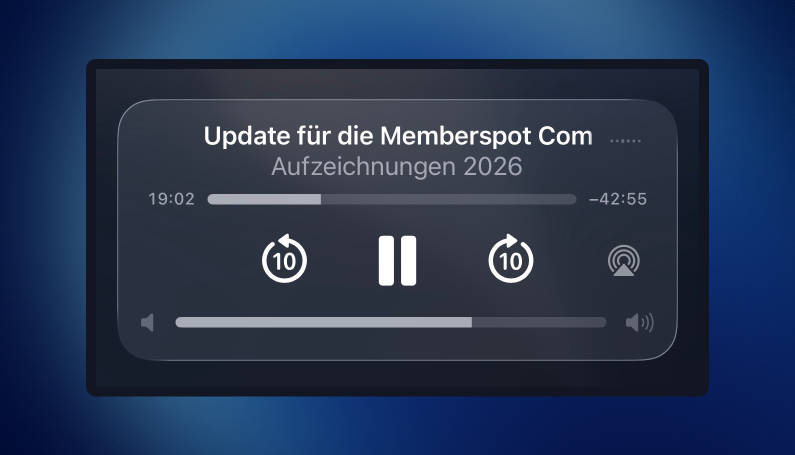
Background Playback (Beta)
Courses continue to play even when your phone is locked or the app is running in the background—just like a podcast. This is especially useful for audio- or video-heavy courses: Your members can keep learning while jogging, on the train, or on the go, without having to keep their eyes on the screen. Playback is controlled directly via the media controls on the lock screen.
To be honest: where the boundaries lie
We like to showcase new features along with their capabilities and limitations so that no one is disappointed:
Background playback works only in the native apps, not in the PWA.
- Only the audio is played—the video remains frozen at the point where you left off.
- The lock screen includes the standard media controls (play/pause, forward/back), but there is no option to skip lessons.
- On Android, push notifications do not work at this point due to system limitations.
As soon as we roll out the Custom Mobile Apps, the feature will, of course, also be available in your own apps. If you recommend the Memberspot apps to your members today, they’ll be able to use the feature right away.
The New Course Playlist
The course playlist in the member app is now much more mobile-friendly. Using a tab at the bottom of the interface, you can open the lesson overview and easily switch back and forth between chapters and lessons—on desktop via the sidebar and on mobile via a drop-down bottom sheet.
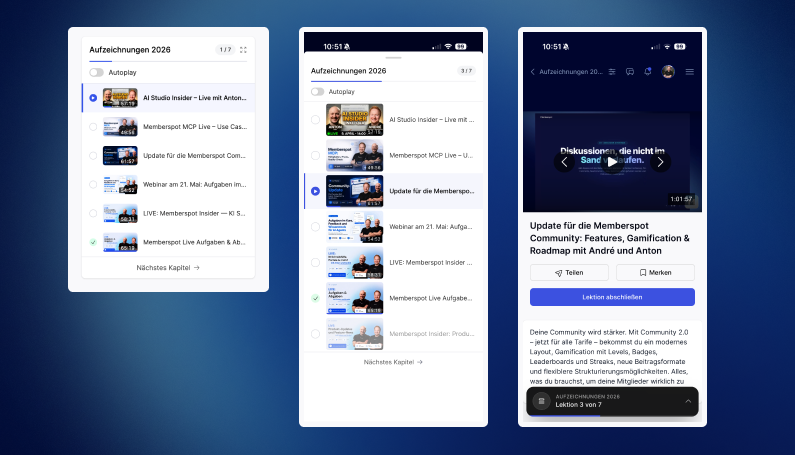
Both are live and available on all plans.
Block B: AI Agents Become Autonomous
With Memberspot AI Studio (available starting with the Scale plan), you can build specialized AI agents. A whole new category has been added: Background Agents —agents that aren’t interacted with via chat but work independently in the background.
What Background Agents Can Do
A background agent performs actions on a schedule rather than waiting for a chat message. You control the following:
- Trigger: on a schedule (e.g., every 6 hours, every 24 hours, weekly), manually via a button, or event-based through an automation.
- Acting User: The agent acts on behalf of an admin you select—using that admin's permissions.
- Tools: Platform tools, extensions, and knowledge resources that the agent needs to perform their task.
- Edit Mode & Permissions: From read-only access to creating pages—granularly controlled by area (Community, Members, Courses, Portals, etc.).
- Limits on costs and effort: how many times you can iterate, how many workers run per wave, and what the token budget is. This way, you won't open a "bottomless pit."
If a run encounters an error, the agent automatically retries. The maximum execution frequency is once per hour (up to 24 runs per day). Only administrators have access to background agents—they are neither visible nor usable by your members.
Example: the Community Health Report
A good example of a use case is a Community Health Report (which will also be available as an agent template in the coming weeks). For example, the agent evaluates the status of your community on a weekly basis:
- Which Spaces are active?
- How many posts were created?
- Which members are particularly dedicated?
- Which topics and clusters are currently trending?
The result is an automatically generated report—ideal for identifying trends over time. With a very large, active community (keyword: 200,000 members), a shorter interval may even be useful; for most, weekly is sufficient.
Tools, MCP, and Knowledge Resources
Using our MCP and API integration, you can connect virtually any tool that can be controlled through them—such as a CRM like HubSpot. The advantage of MCP: Even without developer expertise, you can control in greater detail what an agent is and isn't allowed to do.
Currently, the available knowledge sources include Google Drive, Notion, Intercom, and WordPress, as well as direct file uploads (PDFs, spreadsheets, and more). You create a knowledge collection and assign it specifically to an agent. It’s important to remember: Only give an agent the sources and permissions they actually need.
New Voter Model – Three Stages
Regardless of the background agents, we've redesigned the model selector within the agents. You can now choose from three levels:
- Free plans —no additional costs.
- Premium models – billed through Memberspot, with access to the top models from well-known providers.
- Bring Your Own Key – your own contract with the respective provider, without Memberspot acting as an intermediary.
We typically introduce new models shortly after their release. When it comes to background agents, we deliberately do not recommend using free models: For autonomous reasoning in the background, the agents need more powerful models to deliver reliable results.
Availability & Costs – The Truth: Background Agents are available starting with the Scale plan (as well as the Elite and Enterprise plans), but not with the Free/Starter or the legacy Free/Pro plans. Because the cost can be high, they are billed via Bring Your Own Key or purchased credits.
We're excited to hear about your use cases—and we're planning a separate, in-depth webinar on background agents.
Block C: Community Updates at a Glance
There's been a lot going on in the community over the past few weeks. Much of it is already live, but we keep getting asked about it in Support—so we've compiled it all here.
Upvote Feature & New Space Types
The most common question over the past few weeks: “Can we use the upvote feature, too?” – Yes, the feature has been available for quite some time. With the community relaunch in April, two new Space types were added, available on all plans:
- Private Spaces (Membership by Request): Members can only join if they have submitted a membership request and it has been approved. (In addition to the familiar " public " and " private/restricted" types.)
- Q&A or voting sections: Members ask questions or submit ideas, and the community votes—moderated responses are also possible.
In addition, Spaces can be grouped into menu sections to organize the community clearly.
Status templates can be freely defined
For Q&A and voting spaces, choose a status template so that the logic is clear to your members—for example, Q&A or Feedback Board. You can freely customize statuses, define your own, or start with a blank template, and you can also specify which filters are displayed to members by default (such as only “open” ideas).
Our recommendation: Think through the status structure carefully from the start, and then keep it as consistent as possible. Simply renaming statuses isn't a big deal—but a later semantic restructuring, in which old posts suddenly end up under a different status, certainly is.
Finalizing Membership Applications
The request flow has received several small but noticeable improvements:
- Members can include a message with their request.
- Profiles are clickable in the approval widget —you can see right away who wants to join.
- A push notification is sent when a post is approved or rejected; if there are many approvals, the moderators are also notified.
Important: Approval is handled through the member app (not through the admin panel), since moderators aren't necessarily admins. In the admin panel, you can view the history of how requests were handled.
Move posts between Spaces
Moderators can now move posts between Spaces—without losing any data:
- Comments will be preserved and carried over.
- When switching between the normal space and the Upvote/Q&A space, reactions are converted (a "Like" becomes an "Upvote" and vice versa).
Limitations: To move a space, you must be a moderator in both spaces, and this is only possible within the same learning area or school.
Embedding External Videos via Links
Video posts were already possible via upload and recording. New: direct embedding via link. You paste a link, Memberspot fetches the preview, you can optionally add a description—and the player plays directly within the post. Currently supported platforms include YouTube, Vimeo, Loom, and Wistia.
Notifications – three channels, each with its own on/off switch
Your members can now manage their notifications separately by type and channel: in-app, push, and email —with auto-save, so there’s no need to click “Save.” Push notifications are only triggered if the technical requirements (e.g., mobile app) are met. As an admin, you can view these settings in a member’s profile—which is handy if someone opts out of receiving emails. New notification types have also been added.
Badges & Milestones – Now Live
What we recently announced as " coming soon " is now available— across all plans and communities:
- Badges based on defined mechanisms: Anniversary/Recognition badges, Birthday badges, Community Joining badges, and Top Poster badges.
- Milestone badges for levels in the categories of posts, comments, likes given, likes received, years of membership, and activity streak.
You can award and manage badges in the admin panel; milestones appear in the Activity tab of the member profile. Levels and milestones can be customized and expanded to suit your needs. Currently, you can select icons from our libraries—the option to upload your own graphics is coming soon.
Block D: Outlook – Stripe Connect Beta
For everyone who sells through Memberspot: The new Stripe Connect integration is in beta. You can find it under Settings → Integrations, where you can connect your own Stripe account to Memberspot and create product links to your offers—similar to how it works with CopeCart or Digistore.
Interested? Sign up for the beta program at community.memberspot.de, and we'll grant you access. We're especially interested in direct, real-world feedback so we can transition Stripe Connect from the beta to the live version for everyone as soon as possible.
What "Beta" Means to Us
- Beta features will be manually enabled for you —you'll become part of the beta program and can opt out at any time.
- You'll get early access to new features before they're rolled out to everyone.
- There may be a few minor issues here and there—"beta" means it's usable, but not yet final.
- The beta program is free.
- Please note: If you test a feature in the beta that will later be tied to a higher plan (e.g., AI features starting with the Scale plan), you may lose access to it after the beta ends if your plan does not include that feature.
From the Q&A
A few points that came up from the audience during the live event:
- Jump to comments: Currently, clicking on a notification takes you to the post, not directly to the comment. We'll take that into account—most effectively as a feature request via the Ideas Board in the Community, because customer feedback there gathers upvotes and helps prioritize implementation.
- Why do we have a separate community registration? The community runs on our own software; the separate registration is required for reasons including data protection. In the future, we hope to make this process more convenient. Registration is free and quick.
- Cross-Course Media/Asset Library: Currently, videos are created individually for each course. A central, reusable media library is being considered—but a specific timeline has not yet been set. (Incidentally, for exams and assignment submissions, the ability to reuse content within a learning area is already much better implemented.)
Do you have any feature requests? The best place to share them is directly on the Ideas Board in the Community—that way, we always have a real customer’s voice behind each idea.
In short
The first half of 2026 was one of the busiest in terms of releases in a long time. The July issue of *Insider* provided a roundup of what’s already live:
- Mobile Learning: Background Playback (Beta, native apps) and a mobile-friendly course playlist—available for all plans.
- AI Studio: autonomous background agents with schedules, tools, knowledge sources, and cost limits—plus a new, three-step model selector (starting with Scale).
- Community: new Space types (private & Q&A/Voting), refined membership requests, moving posts without data loss, external videos via links, granular notifications, and badges & milestones.
- What's Next: Stripe Connect is in beta—sign up now.
Or in one sentence:
Memberspot is more mobile, smarter, and much more deeply rooted in the community—and we’re far from done.
Have fun trying it out—and if you'd like, join our community at community.memberspot.de.
Your Member Spot 👋





%201.png)