On May 21, Anton and André demonstrated live how both features work. Here’s a recap—for everyone who was there and for everyone who missed it.
In a nutshell
- AI Agent: Extensions vs. Knowledge Tools — When Your Agent Needs Which Tool
- Memberspot is evolving from a course platform into an interactive work and knowledge system
AI Agent — Extensions vs. Knowledge Tools
Your AI agent can now work with external systems. But when does it need an extension—and when does it need a knowledge tool? Anton and André explained the difference live.
Extensions: Individual actions, live and in real time
An extension connects your agent to an external system via MCP, REST API, or Notion OAuth. From then on, your agent can read data and perform actions in real time —right from the chat, without having to open the tool itself.
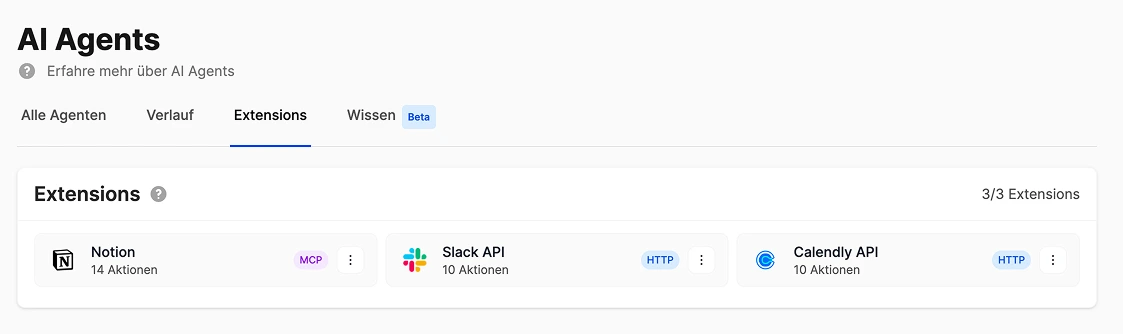
What does that mean, exactly? Your agent creates a page in Notion, updates a status, or answers a question from an external tool. One click, one reply—done.
Once connected, Memberspot automatically displays all available actions—separating read actions from write actions. For each action, you decide whether your agent is allowed to use it and whether they should ask the user for permission first. Up to 10 extensions per account.
Extensions in Practice
Notion: Your team has playbooks, SOPs, and FAQs in Notion. Agents can search the knowledge base in real time, answer team questions directly, and update pages—all without switching tabs.
Slack: Your agent compiles a weekly summary of which members are falling behind and automatically posts the report to your coach channel. Memberspot integrates with Slack—right where you work anyway.
Calendly: Your agent checks for available times and sends members the booking link directly—without you having to open Calendly or search for the link manually.
WordPress: Your agent takes your best course content and publishes SEO-optimized blog posts directly on WordPress. Your own content becomes a growth engine.
Knowledge tools: Large volumes, quickly searchable
Extensions reach their limits when dealing not with a single piece of information, but with many documents. An extension has to go through all the entries one by one every time a question is asked. A knowledge tool has already read all the content and can find the right answer immediately.
Imagine a bookshelf. An extension has to pull out each book one by one, open it, and read through it for every question. A knowledge tool has already read all the books—and knows right away which one has the answer.
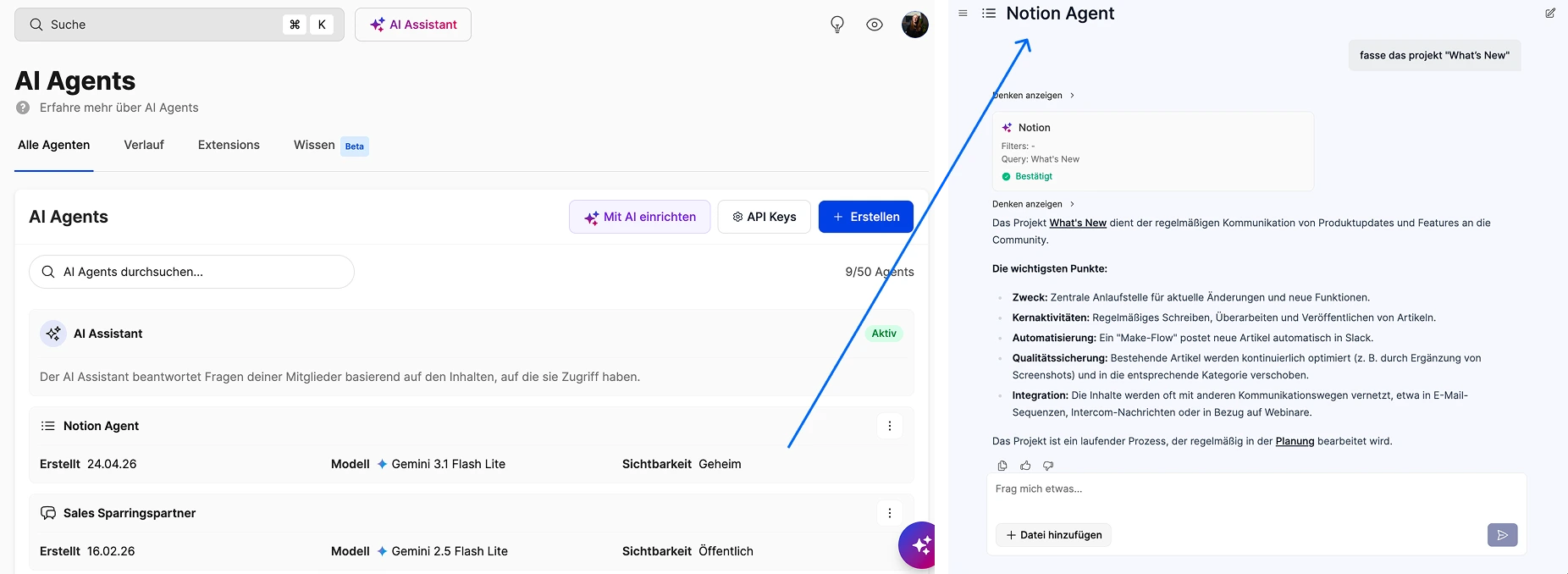
First, you connect a data source—a connector. This could be a direct file upload, your Memberspot account itself, a Google Drive folder, or Notion. Anything you store there will be searchable by your agent.
You use the connectors to create sources—that is, specific data sets that are indexed. 22 documents from Google Drive, 9 pages from Notion, uploaded PDFs. The content is processed in the background so that your agent doesn’t just search for individual words, but understands the context.
Finally, you group sources into collections. A collection specifies which sources belong together and how the agent should use them. "Course Documents," "HR Policies," "Onboarding Materials"—this way, the agent knows where to look for answers to specific questions.
Course providers with a support agent: Save all help articles, course FAQs, and guides as resources—either by uploading files or directly from Memberspot. Your members ask questions, and the agent responds 24/7.
Agency with client insights in Google Drive: Link 22 documents from a Drive folder as a source. The agent searches through project briefs, process documents, and templates—without anyone having to open the folder.
Knowledge-based companies using Notion: Internal SOPs, checklists, and guidelines sourced from Notion. With everything bundled into a single collection, the agent knows exactly where to look: for HR questions, here; for product questions, there.
When to do what — the rule of thumb
Individual actions, real-time data, making changes within a tool → Extension. Searching through large volumes of documents → Knowledge Tool.
You can combine both—and that’s exactly where the sweet spot lies.
A fully equipped onboarding agent: They’re familiar with the employee handbook via a knowledge tool, answer questions about processes and policies—and at the same time use an extension to set up the new employee in the HR system and create their first task in Notion. All from a single chat.
Memberspot makes your knowledge accessible to AI agents—without requiring you to build your own technical infrastructure. Upload your content, connect the agent, and you're done.
Using Notion as an example: The same service, two roles
Notion appears in both areas—and that’s exactly what confuses people the most. The difference is simple:
Notion as an extension: Your agent accesses Notion in real time. They read a specific page, update a status, or create a new entry. Individual actions, in real time, always up to date. Example: “Set the status of Project X to ‘Completed.’” The agent does this directly in Notion.
Notion as a knowledge tool: Your agent has indexed 9 Notion pages in advance and searches them when you ask questions. It doesn’t change anything—it just reads. But it understands the context and finds answers, even if the question is phrased differently than the content. Example: “How does our onboarding process work?” The agent finds the answer from three different Notion pages—without you having to specify which ones.
The difference in a nutshell: An extension is like opening Notion yourself and doing something. Wissenstool is like someone who has read all your Notion pages and answers your questions off the top of their head.
You can find all the details about extensions in the What's New article: Your agent now works directly within your tools
Missed the recording?
You can find the full webinar on YouTube and in our community:
Assignments and Submissions
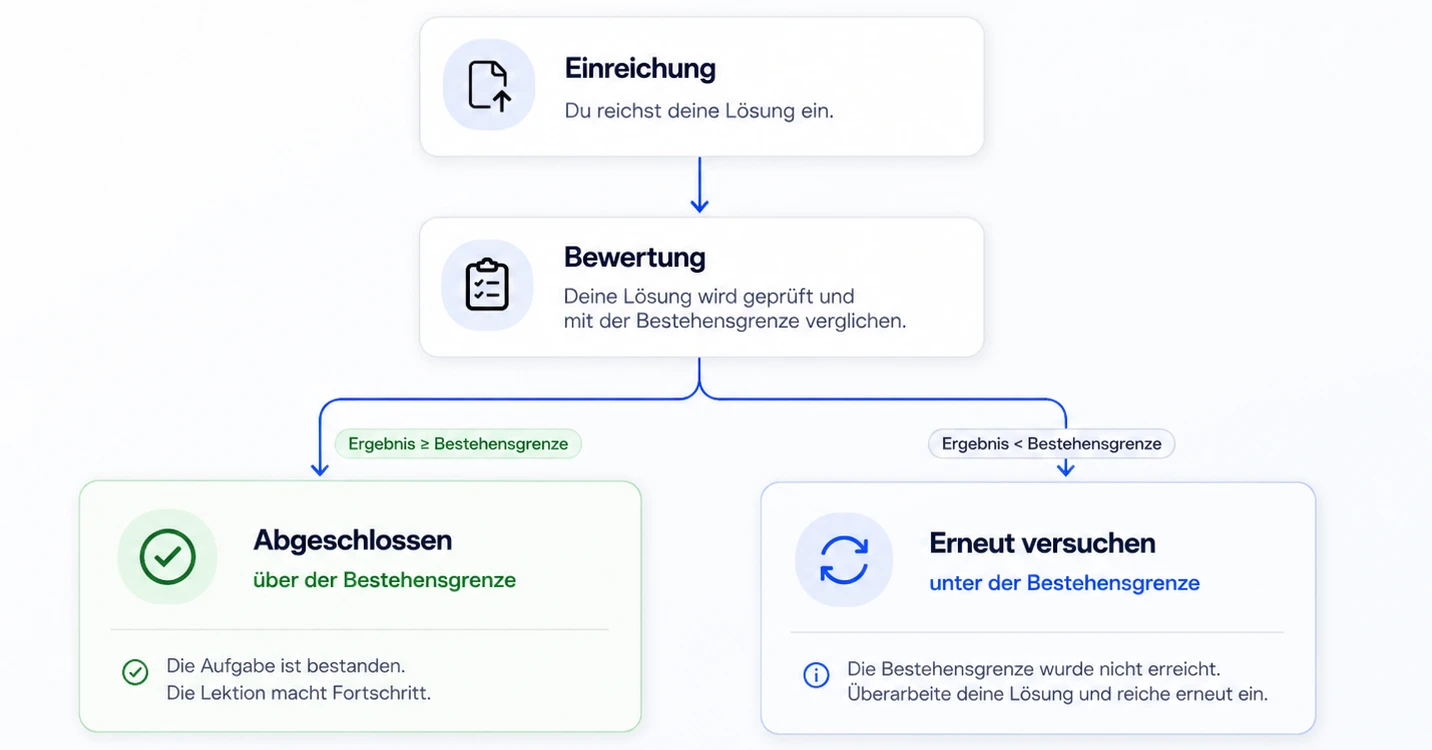
Learning assignments turn a passive course into an active learning process. You create assignments, your members submit their work—as text, a file, a video, a PDF, or a Word document—and you or an assigned tutor grade them and provide feedback. For mandatory assignments, the lesson isn’t considered complete until the member has met the passing threshold.
How it works:
You create assignments centrally and incorporate them into your course as "Assignment" lessons. A lesson can combine multiple assignments—such as a video and a written reflection—so that you can grade each submission individually. Only one file is submitted per assignment.
Rate it according to your own criteria:
Either using a percentage scale or a criteria-based grading rubric with multiple criteria. You set a passing threshold—anyone who scores below it will not be able to proceed in the course for required assignments. You can assign multiple tutors per assignment, who will be automatically notified whenever a submission is made.
Real-world use cases:
- Sales coach: “Record your sales call and upload the video.” The instructor will evaluate it based on defined criteria.
- Instructor: “Submit your final project.” Grading is based on a rubric—only those who pass will receive the certificate.
- Agency Onboarding: Collect brand assets, logos, and briefings in a structured manner and share them in a secure, restricted-access area.
Submissions are not public—only you, your tutors, and the submitting member have access.
All the details: Assignments directly in the course
Missed the recording?
You can find the full webinar on YouTube and in our community:



%201%20(1).png)